

What is a WiFi Over & Under Voltage Protector?
A WiFi over & under voltage protector is an intelligent power protection device with WiFi remote monitoring and control, plus overvoltage, undervoltage, overload, and surge (pulse) protection. It mainly protects low‑voltage and network equipment such as routers, optical modems, switches, and cameras from damage caused by abnormal voltage, lightning pulses, and current surges. It also supports remote power on/off, restart, and real-time voltage monitoring via mobile phone.
I. Core Functions
1. Basic Electrical Protection
- 1.Remote control at anytime from anywhere
- 2.Schedule/Timer/loop timer
- 3.Energy monitoring
- 4.Under voltage protection: 80V-210V adjustable(default:170v)
- 5.0ver voltage proteciton: 150V-300V adjustable(default.270v)
- 6.Over current protection: 1A-63A adjustable(default: 63A)
- 7. Electric leakage protection:10-100mA adjustable(default.30mA)
- 8. Preset current/voltage threshold values by app,Once thereal-time/current/voltage reaches thethreshold values,Theconnected electrical appliances will be automatically turned off
2. WiFi Smart Functions
- Remote monitoring of real-time voltage, current, power, and energy consumption via mobile APP (Tuya,eWeLink, etc.).
- Remote control, timing, countdown, and one-click restart (no need for on-site reset when router/modem freezes).
- Alarm notifications for overvoltage, undervoltage, power failure, and offline status.
- Some models support scene linkage (automatic restart after power recovery, linkage with cameras or network devices).
II. Key Parameters & Selection Tips
✅ Core Parameters
- Rated Supply Voltage:AC 220V
- Operation Voltage Range:AC80v-300v(single phase)
- Rated Frequency;50/60Hz
- Electric Current (>A)setting range:1A-63A
- Overvoltage (<U) setting range:150V-300v (adjustable)
- Undervoltage(<U) setting range:80V-210V (adjustable)
- Electric Leakage Protection:10mA-100mA(This feature can be turned off)
Error:2% - >U and<U trip delay:1s-30s (adjustable) (default: 1s)
- Reset/Start Delay:1s-300s (adjustable) (default: 5s)
- Voltage Measurement Accuracy:l% (Not exceeding 1% of the overall range)
- Rated Insulation Voltage:400V
- Output Contact:1NO
- Altitude:<2000m
- Operating Temperature:(-30’℃ ~70’℃ )Power Display
- Range:0-99999.9kw/h
✅ Application Scenarios
- Home / rental: 63A, 2.4G WiFi, auto-reset, with surge protection.
- Shops / monitoring / weak current boxes: 100A, high pulse resistance, remote alarms.
- Old communities / unstable voltage: High surge rating, wide thresholds, auto-reset.
VVV. Installation & Wiring
- Wiring: Connect Live (L), Neutral (N), Earth (PE) as marked. Input to mains, output to devices. Ground wire is mandatory.
- Location: Install near weak current box or socket with short, thick wiring to reduce interference.
- Network setup: Power on → connect to device hotspot → add device in APP → connect to 2.4G WiFi.
IV. Common Issues & Solutions
- Frequent tripping:
- Unstable voltage: Widen protection thresholds.
- Overload: Switch to 100A model or reduce connected devices.
- Strong pulse interference: Use higher‑grade surge protector.
- WiFi connection failure / offline:
- Use only 2.4G WiFi; avoid special characters in password.
- Weak signal: Add WiFi repeater.
- No reset / no protection: Check wiring, reset button, APP settings, or hardware fault.
V. Summary
WiFi over & under voltage protector = voltage protection + surge protection + remote network control. It prevents equipment damage and on-site restarts, making it essential for home weak current boxes.
Share This Article
Follow Us
What is a WiFi Over & Under Voltage Protector?
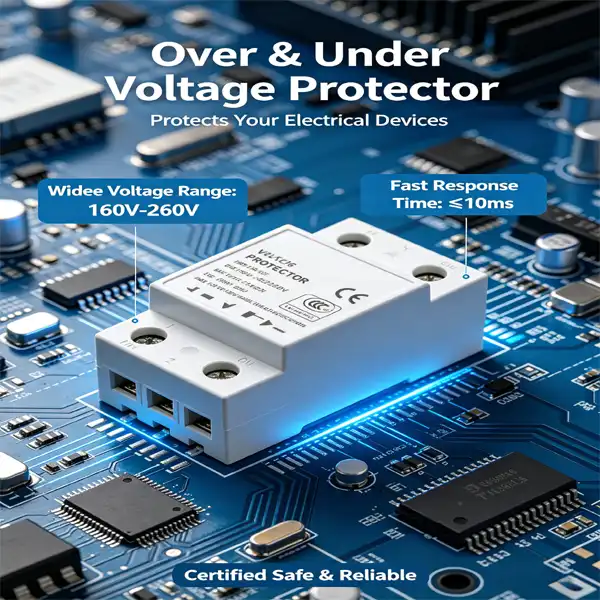
A WiFi over & under voltage protector is an intelligent power protection device with WiFi remote monitoring and control, plus overvoltage, undervoltage, overload, and surge (pulse) protection. It mainly protects low‑voltage and network equipment such as routers, optical modems, switches, and cameras from damage caused by abnormal voltage, lightning pulses, and current surges. It also supports remote power on/off, restart, and real-time voltage monitoring via mobile phone.
I. Core Functions
1. Basic Electrical Protection
- 1.Remote control at anytime from anywhere
- 2.Schedule/Timer/loop timer
- 3.Energy monitoring
- 4.Under voltage protection: 80V-210V adjustable(default:170v)
- 5.0ver voltage proteciton: 150V-300V adjustable(default.270v)
- 6.Over current protection: 1A-63A adjustable(default: 63A)
- 7. Electric leakage protection:10-100mA adjustable(default.30mA)
- 8. Preset current/voltage threshold values by app,Once thereal-time/current/voltage reaches thethreshold values,Theconnected electrical appliances will be automatically turned off
2. WiFi Smart Functions
- Remote monitoring of real-time voltage, current, power, and energy consumption via mobile APP (Tuya,eWeLink, etc.).
- Remote control, timing, countdown, and one-click restart (no need for on-site reset when router/modem freezes).
- Alarm notifications for overvoltage, undervoltage, power failure, and offline status.
- Some models support scene linkage (automatic restart after power recovery, linkage with cameras or network devices).
II. Key Parameters & Selection Tips
✅ Core Parameters
- Rated Supply Voltage:AC 220V
- Operation Voltage Range:AC80v-300v(single phase)
- Rated Frequency;50/60Hz
- Electric Current (>A)setting range:1A-63A
- Overvoltage (<U) setting range:150V-300v (adjustable)
- Undervoltage(<U) setting range:80V-210V (adjustable)
- Electric Leakage Protection:10mA-100mA(This feature can be turned off)
Error:2% - >U and<U trip delay:1s-30s (adjustable) (default: 1s)
- Reset/Start Delay:1s-300s (adjustable) (default: 5s)
- Voltage Measurement Accuracy:l% (Not exceeding 1% of the overall range)
- Rated Insulation Voltage:400V
- Output Contact:1NO
- Altitude:<2000m
- Operating Temperature:(-30’℃ ~70’℃ )Power Display
- Range:0-99999.9kw/h
✅ Application Scenarios
- Home / rental: 63A, 2.4G WiFi, auto-reset, with surge protection.
- Shops / monitoring / weak current boxes: 100A, high pulse resistance, remote alarms.
- Old communities / unstable voltage: High surge rating, wide thresholds, auto-reset.
VVV. Installation & Wiring
- Wiring: Connect Live (L), Neutral (N), Earth (PE) as marked. Input to mains, output to devices. Ground wire is mandatory.
- Location: Install near weak current box or socket with short, thick wiring to reduce interference.
- Network setup: Power on → connect to device hotspot → add device in APP → connect to 2.4G WiFi.
IV. Common Issues & Solutions
- Frequent tripping:
- Unstable voltage: Widen protection thresholds.
- Overload: Switch to 100A model or reduce connected devices.
- Strong pulse interference: Use higher‑grade surge protector.
- WiFi connection failure / offline:
- Use only 2.4G WiFi; avoid special characters in password.
- Weak signal: Add WiFi repeater.
- No reset / no protection: Check wiring, reset button, APP settings, or hardware fault.
V. Summary
WiFi over & under voltage protector = voltage protection + surge protection + remote network control. It prevents equipment damage and on-site restarts, making it essential for home weak current boxes.
Contact Us
Share This Article

Contact Us
Have questions about our products or services? Our team is here to help you with any inquiries.